
MaintMate: Two-Clock Maintenance Compliance for Aircraft Owners and A&P/IA Shops
MaintMate tracks every annual, AD, and 100-hour on both calendar and tach time, with a qualified A&P/IA signing off every entry. A Southeastern Technical white paper.
Executive summary
Aircraft maintenance compliance is a high-stakes problem still run, in most hangars, on paper logbooks and a patchwork of spreadsheets. An annual that slips past twelve calendar months, an Airworthiness Directive nobody flagged, a 100-hour inspection that came due on the tach while the owner was watching the wall calendar, any one of them makes the aircraft unairworthy and grounds it, and in the worst case it is a safety event with a liability tail. For a shop carrying a book of client aircraft, the exposure multiplies: there is no single source of truth, just a stack of binders and the memory of whoever signed the last entry.
MaintMate is software we built to close that gap. It tracks every recurring requirement on both clocks at once, calendar date and time-in-service (tach hours / cycles), surfaces what is due, overdue, and coming up, and keeps a clean digital logbook and audit trail behind it. It uses AI where AI genuinely helps: parsing a maintenance program from an aircraft’s make, model, and engine, flagging what is due, and answering “what’s due on this ship and why” in plain language. And it stops exactly where it should, every AI suggestion lands unverified, and a certificated mechanic or IA owns every sign-off and every return-to-service. MaintMate runs in production today at maintmate.net. This paper walks through the problem it solves and the real screens that solve it.
The problem: two clocks, paper records, and no margin
Most scheduling software watches one clock, the calendar. The first of the month comes around, a reminder fires, you are done. Aircraft maintenance does not work that way, and a tool that only watches the wall calendar quietly lets the other clock run past due.
Regulated maintenance runs on two clocks simultaneously. Some requirements are date-driven: the annual inspection under FAR §91.409(a) every twelve calendar months, the ELT inspection under §91.207(d), the pitot-static and transponder checks under §91.411 and §91.413 every twenty-four calendar months for IFR, the 30-day VOR check under §91.171. Others are time-in-service-driven: the 100-hour inspection under §91.409(b) for aircraft flown for instruction for hire, oil changes, the magneto 500-hour, progress toward TBO. And a large class of items, propeller overhaul, vacuum pump, engine hoses, TBO itself, are due on whichever comes first, a date or an hour count. An aircraft that flies eighty hours one month and five the next does not hit its hour-based items on any tidy calendar. Whichever clock trips first wins.
Now layer on Airworthiness Directives and service bulletins. A recurring AD might be due every so many hours, every so many calendar months, or both, each with its own citation that has to appear in the logbook at return to service. Miss one and the aircraft is not airworthy, full stop, regardless of how good it looks on the ramp.
Tracking all of this by hand is exactly where things slip, not through negligence, but because a spreadsheet cannot reason about dozens of items, each on its own pair of moving clocks, with the tach drifting every week. For an individual owner that is stressful. For an A&P/IA shop managing many client aircraft, it is an operational risk with no central record: each aircraft’s status lives in a different binder, and the question that matters after the fact, can you prove the right person did the right work on time?, has no fast answer.
The solution: MaintMate
MaintMate is a lightweight, mobile-responsive web application for tracking calendar- and tach-driven maintenance across a fleet of one aircraft or many. It supports three working roles, individual owners, A&P/IA shops managing aircraft on behalf of their clients, and an admin, plus a read-only viewer role for anyone who needs visibility without sign-off authority.
The core of MaintMate is a due-status engine that evaluates every maintenance item against both of its intervals. Each item carries a calendar interval, an hours interval, or both, and the system computes what is due against whichever clock is closer. Status is expressed in plain Red-Yellow-Green: overdue (past due on date or hours), due soon (within 30 days or 10 hours), upcoming, or current. When you log a completion, MaintMate computes the next due date and next due tach from the completion event automatically, so the clocks reset correctly every time.
Around that engine sit the things that make maintenance defensible rather than merely tracked: a per-item sign-off authority model, an immutable history trail for every entry, and an AI assist that drafts the program but never signs anything off.
How it works, the real screens
Fleet dashboard
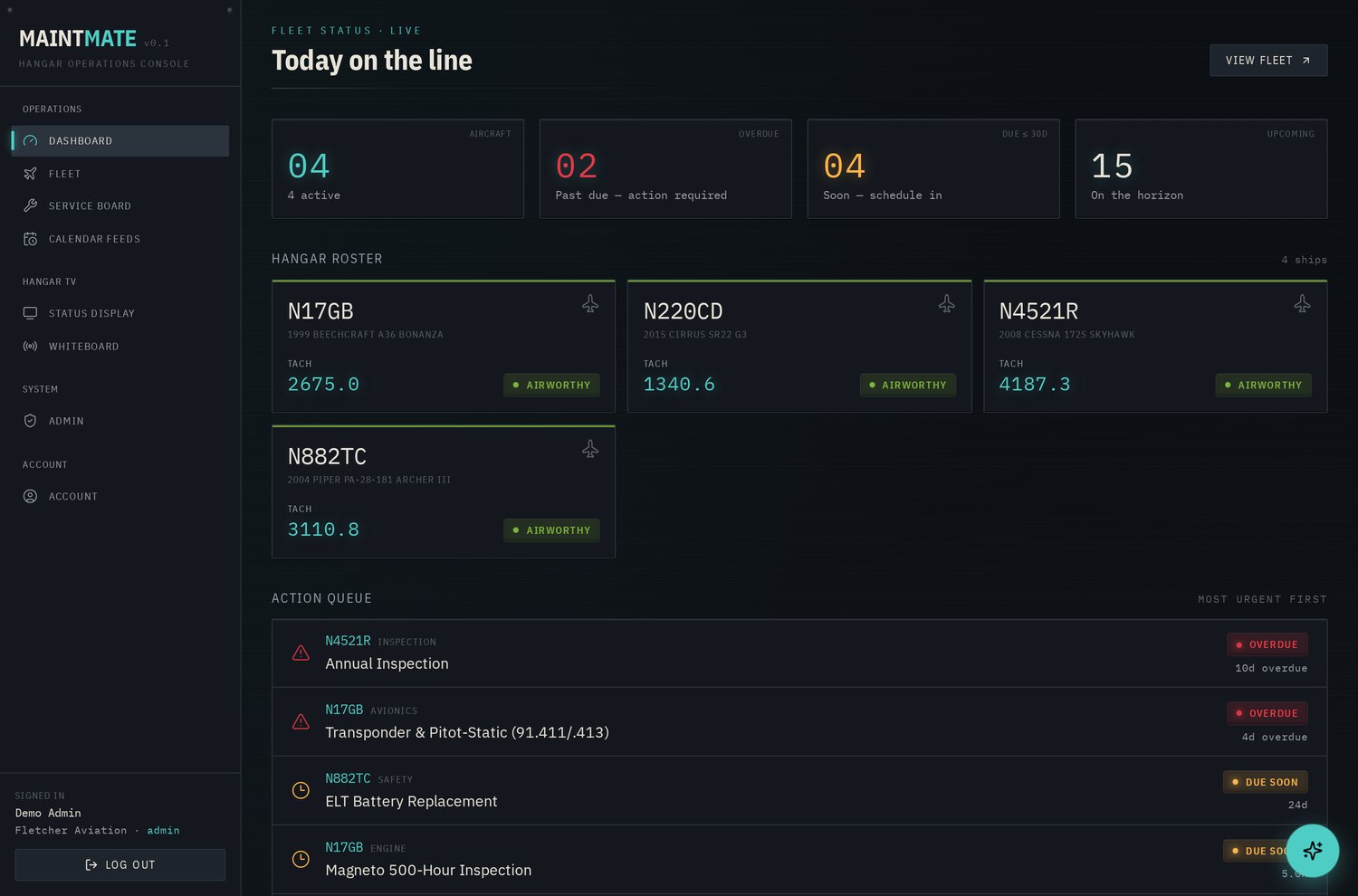
The dashboard is the daily line check. Four annunciator cards across the top read out the numbers that matter, total aircraft, items overdue, items due within 30 days, and items upcoming. Below that, a Hangar Roster shows every aircraft as a tile with its tail number, its current tach, and a status pill: airworthy, N due, or N overdue. An Action Queue lists individual items across the whole fleet, most urgent first, so the first thing you see each morning is the single most pressing thing to deal with, not a wall of green. For an owner with one aircraft it is reassurance at a glance; for a shop it is triage.
Per-aircraft maintenance status
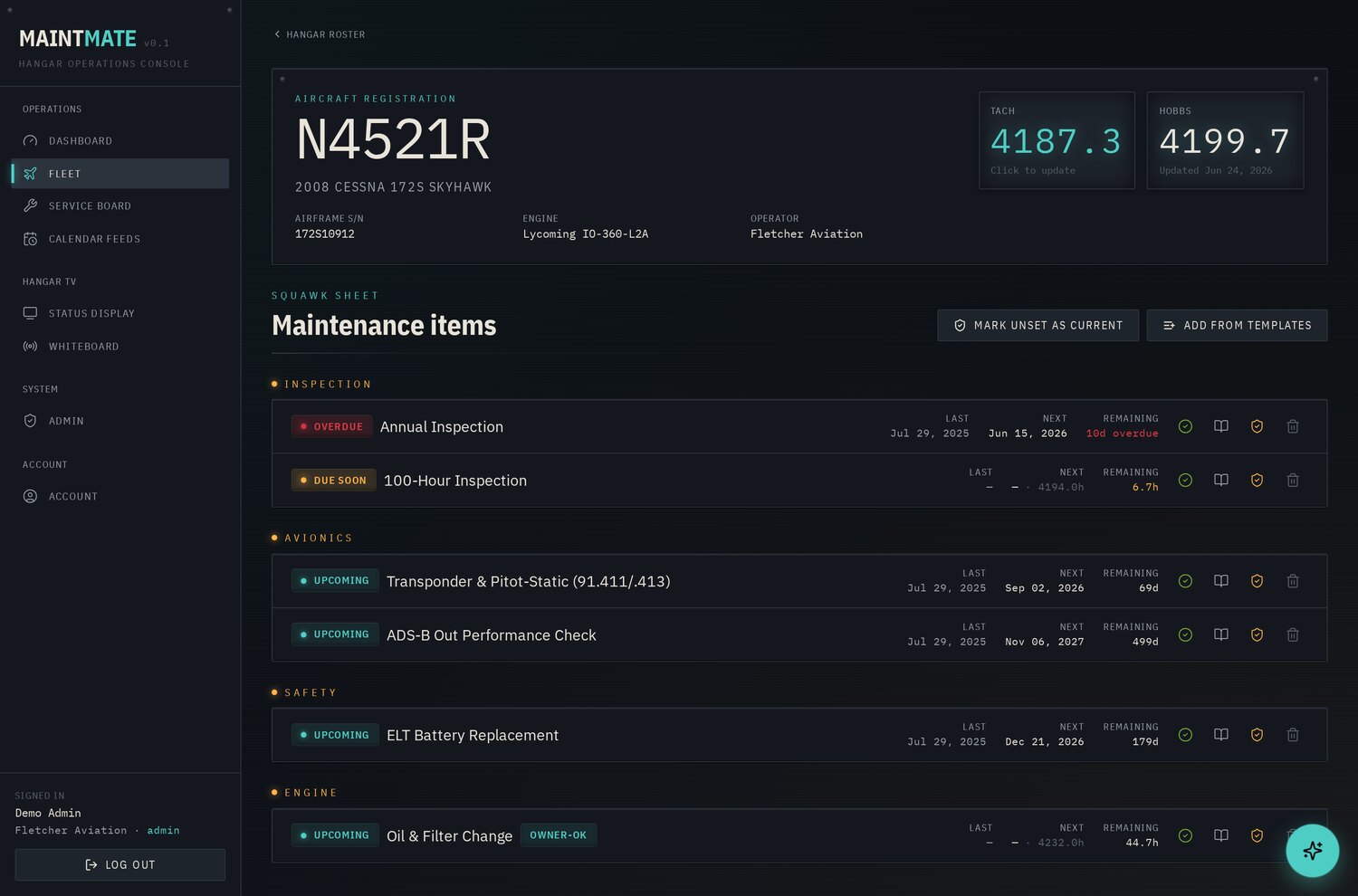
Open an aircraft and you get a cockpit-instrument header: registration (tail number), make/model/year, airframe serial, engine make/model/serial, operator, and large readouts for tach and Hobbs time, tap the tach to update it. Below the header is the squawk sheet: every maintenance item, grouped by category (regulatory, engine, propeller, airframe, avionics, safety), each row showing Last done, Next due (date and tach hours where both apply), and time Remaining against whichever clock is closer, color-coded by urgency. This is the single source of truth a paper logbook never gives you, the whole aircraft’s compliance posture on one screen, both clocks visible at once.
Inspection and AD compliance tracking
Each line on the squawk sheet is a compliance item with a citation attached. MaintMate ships with a starter library of roughly thirty-five templates carrying their regulatory references, the annual at §91.409(a), the 100-hour at §91.409(b), ELT inspection and battery at §91.207, pitot-static/altimeter at §91.411, transponder at §91.413, VOR at §91.171, ADS-B at §91.227, plus the engine, propeller, airframe, and safety items (oil and filter, spark plugs, magneto 500-hour and overhaul, compression/borescope, TBO, prop overhaul, vacuum pump, brakes, tires, battery capacity, oxygen hydrostatic, seat-belt inspection, and more). Recurring Airworthiness Directives and service bulletins are tracked the same way, as line items on the two-clock engine, each carrying its citation, and a built-in data-sources registry links the authoritative references (the FAA Aircraft Registry, the FAA Dynamic Regulatory System for ADs, Type Certificate Data Sheets, FAR Parts 43 and 91, and the Lycoming/Continental service-bulletin indexes) so the IA can check each line against the real document. These templates are defaults to seed the squawk sheet, intervals are adjusted to match each aircraft’s actual Instructions for Continued Airworthiness, type-certificate data, and applicable ADs.
This is also where MaintMate’s discipline shows. Every item carries a sign-off authority: mechanic only, mechanic or owner (for the preventive maintenance an owner may perform under FAR Part 43, Appendix A), or any user. When an owner self-signs an Appendix A item, MaintMate flags it for mechanic verification and keeps the chain honest. When AI proposes an item, it lands with an amber “AI · unverified” badge and counts toward nothing official until a mechanic reviews it against the POH/TCDS and flips it green. Sign-offs are recorded as logbook entries, completion date, tach at completion, who performed the work, A&P/IA certificate number, and notes, and the history for any item is one click away. That record is the point: a maintenance history that captures who, what, when, and under whose authority, and that cannot be silently rewritten, is the difference between passing an inspection and arguing with one.
Scheduling and at-a-glance views
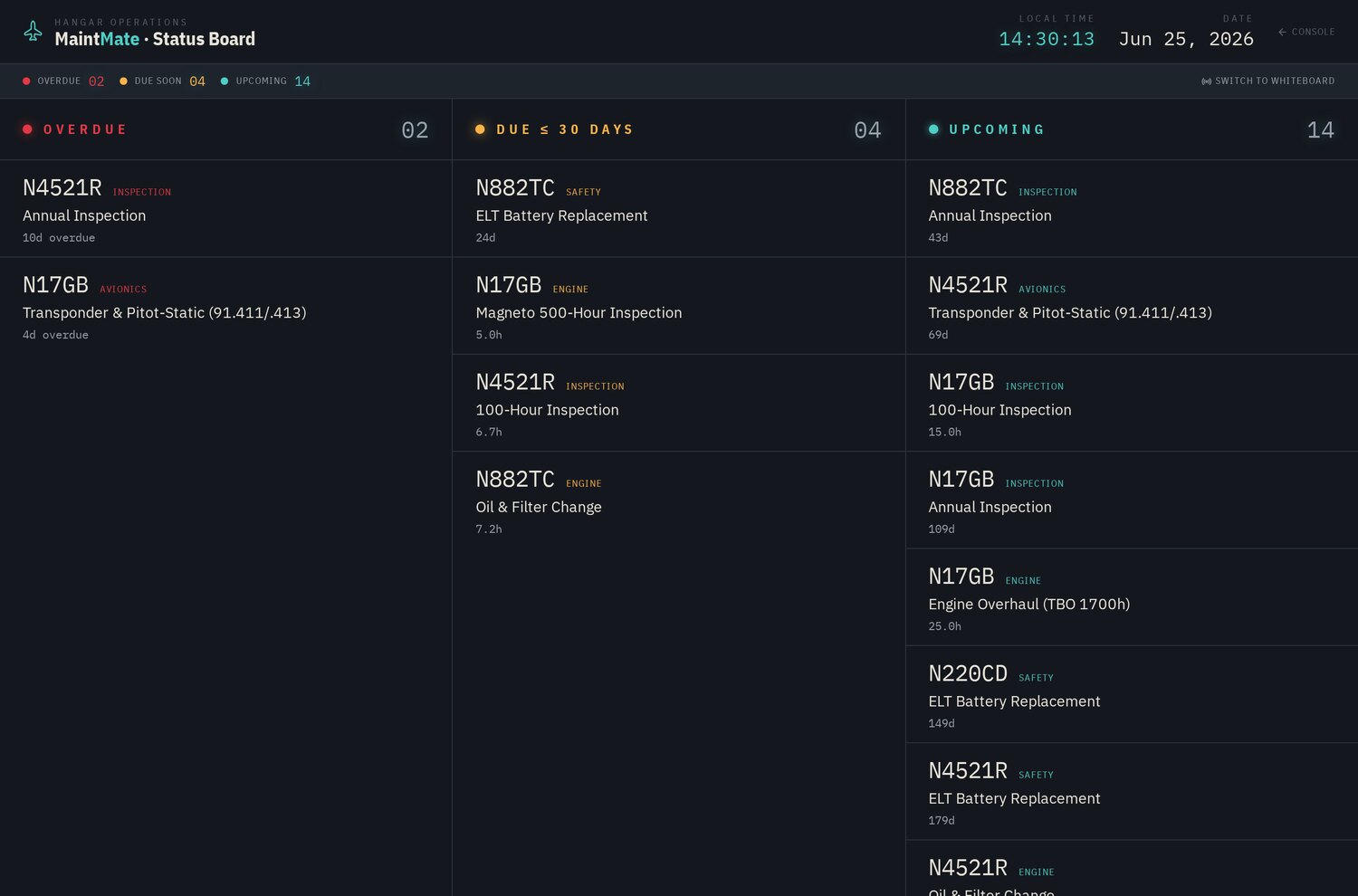
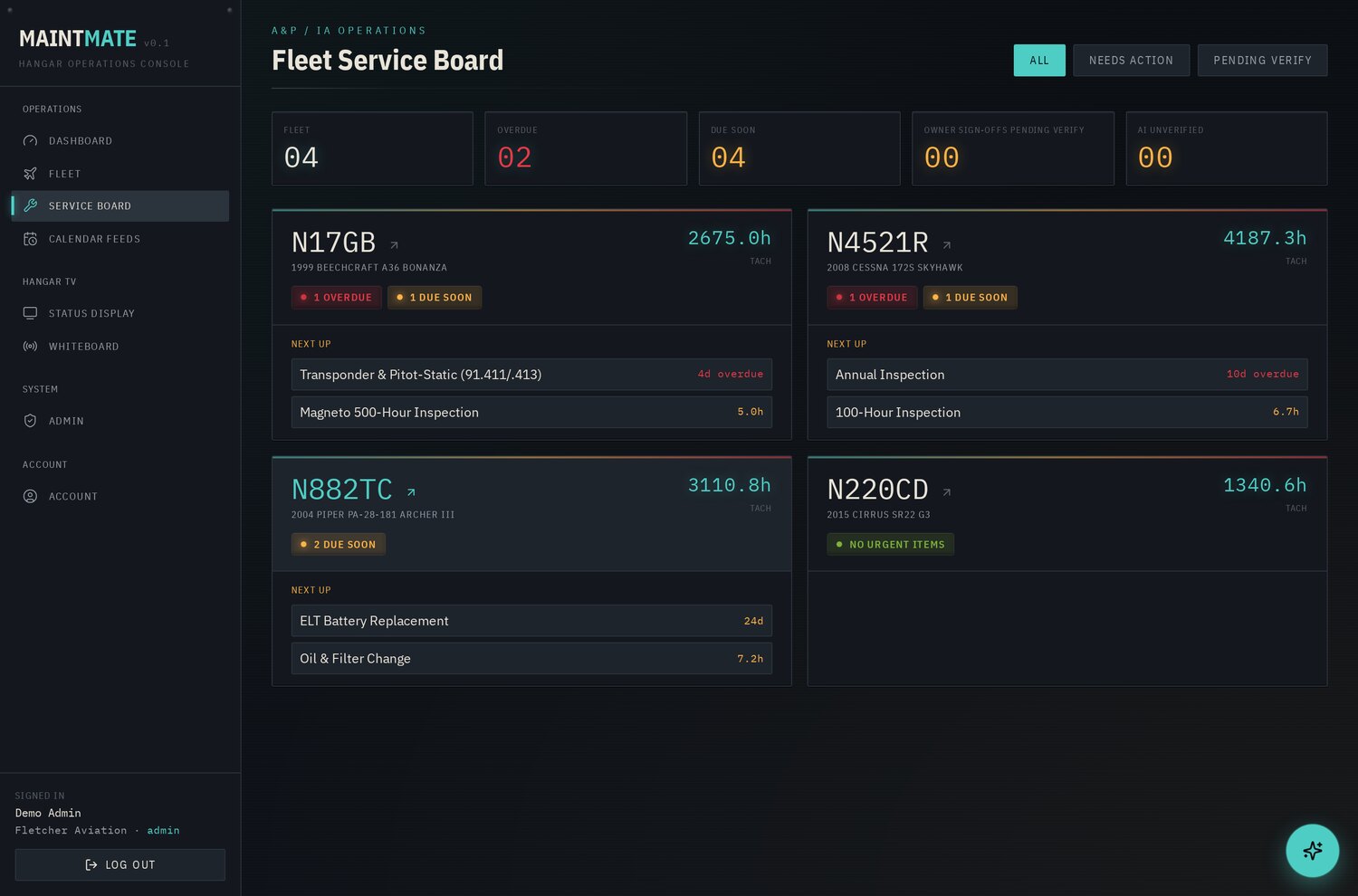
Knowing what is due is only useful if it reaches you where you already work. MaintMate generates private iCal feed URLs you subscribe to from Outlook, Google Calendar, or Apple Calendar, calendar-driven items show up as all-day events, and hour-driven items get a “today” reminder carrying the tach number until you mark them complete. For the shop floor, a TV/whiteboard mode renders the fleet as a three-column status board, Overdue / Due Soon / Upcoming, that refreshes on its own and can run on a kiosk display on the hangar wall, no login required via a read-only display token. The shop’s Fleet Service Board pulls it all together: every serviced aircraft grouped with its owner’s contact, overdue and due-soon counts, and dedicated sections for owner sign-offs awaiting verification and AI suggestions awaiting a mechanic’s eyes, sorted so the aircraft that need attention float to the top.
Where the AI helps, and where it stops
Standing up a maintenance program from scratch is tedious and error-prone: you are staring at an unfamiliar airframe trying to recall every recurring requirement, every interval, every applicable reg. MaintMate’s three-step setup wizard takes that on. Enter an N-number and it pulls the aircraft straight from the FAA Aircraft Registry, make, model, year, serial, engine; or describe the aircraft manually. The AI then drafts a complete maintenance program: aircraft data with the TCDS, and a list of likely items with their intervals and FAR citations attached. You review the list, deselect anything that does not apply, and commit. The same assistant, available as a copilot throughout the app, answers “what’s due on this ship and why” in plain language, grounded in the actual fleet record rather than a generic web search.
And then it stops. Every item the AI proposes is written to the record marked unverified, a machine drafted it; a human has not confirmed it. Nothing counts as part of the real schedule until a qualified mechanic checks that line against the POH, the type data, and the current ADs and flips it from amber to green. The AI never signs anything off. It never decides a safety-critical task is complete. It drafts; the certificated human disposes. That amber-to-green step is the whole philosophy in one interaction, AI doing the slow first-draft work, a person keeping every judgment that carries consequence, and we built it that way on purpose, because an AI that confidently auto-approves a maintenance schedule is precisely the kind of automation that gets an aircraft grounded and an operator in front of the FSDO.
Who it’s for
Aircraft owners. Never miss an annual, an AD, or an hour-based inspection because two clocks were running and you were only watching one. MaintMate gives you a single, current picture of your aircraft’s airworthiness, reminders that reach your calendar, and a clean digital logbook that protects resale value, a buyer’s pre-purchase inspection goes a lot smoother when the maintenance history is complete, timestamped, and signed.
A&P/IA shops. Manage an entire book of client aircraft from one Fleet Service Board instead of a shelf of binders. See every overdue and due-soon item across the fleet at a glance, catch the owner self-sign that still needs your verification, and hand clients professional, audit-ready reports. Knowing what is coming due across the whole fleet is also how you capture more billable work, the 100-hour that is forty hours out, the prop overhaul on the horizon, instead of letting it surface as an AOG surprise.
Why this is the close, not the pitch
Plenty of vendors will sell you a maintenance app. What is different here is that MaintMate is real software we designed, built, and run in production, and the discipline in it is the same discipline Southeastern Technical brings to managed IT and to the AI we build for clients: track the thing that actually matters on the clock that actually governs it, keep an audit trail nobody can quietly alter, and put AI to work on the grinding first-draft labor while a qualified human owns every decision that carries consequence. That is what we mean when we describe ourselves as a managed intelligence provider, practical AI that takes over a specific, error-prone workflow and runs it under human supervision, sitting on top of infrastructure and security that stay solid underneath.
If you fly behind one aircraft or wrench on a hangar full of them, MaintMate is live now at maintmate.net. And if your operation runs on recurring, regulated, deadline-and-safety-driven work of any kind, this is the shape of tool we build, and we can build the version that fits your operation.
Start with a free assessment, we will map the recurring obligations that cost you the most time to track and show you exactly what an AI-assisted tracker would take off your plate while keeping every sign-off in qualified human hands.
Frequently asked questions
Does MaintMate track both calendar time and tach hours for aircraft inspections?
Yes. Its due-status engine evaluates every maintenance item against both a calendar interval and an hours interval, computing what is due against whichever clock is closer. Status shows in Red-Yellow-Green: overdue, due soon (within 30 days or 10 hours), upcoming, or current. When you log a completion, it resets the next due date and tach automatically.
Can the AI in MaintMate sign off aircraft maintenance on its own?
No. The AI drafts a maintenance program and can suggest items, but every AI proposal lands marked "unverified" with an amber badge and counts toward nothing official. A qualified mechanic or IA must check each line against the POH, type data, and current ADs, then flip it green. The AI never signs anything off.
Will MaintMate send aircraft maintenance reminders to my calendar?
Yes. It generates private iCal feed URLs you subscribe to from Outlook, Google Calendar, or Apple Calendar. Calendar-driven items appear as all-day events, and hour-driven items get a "today" reminder carrying the tach number until you mark them complete. Shops can also run a TV/whiteboard status board on a hangar kiosk with no login.
Can an A&P/IA shop manage several client aircraft in MaintMate?
Yes. Shops work from a Fleet Service Board that groups every serviced aircraft with its owner's contact, overdue and due-soon counts, and sections for owner sign-offs awaiting verification and AI suggestions awaiting review. You can see every overdue and due-soon item across the fleet at once and hand clients audit-ready reports.
MaintMate: Two-Clock Maintenance Compliance for Aircraft Owners and A&P/IA Shops
MaintMate tracks every annual, AD, and 100-hour on both calendar and tach time, with a qualified A&P/IA signing off every entry. A Southeastern Technical white paper.
Executive summary
Aircraft maintenance compliance is a high-stakes problem still run, in most hangars, on paper logbooks and a patchwork of spreadsheets. An annual that slips past twelve calendar months, an Airworthiness Directive nobody flagged, a 100-hour inspection that came due on the tach while the owner was watching the wall calendar, any one of them makes the aircraft unairworthy and grounds it, and in the worst case it is a safety event with a liability tail. For a shop carrying a book of client aircraft, the exposure multiplies: there is no single source of truth, just a stack of binders and the memory of whoever signed the last entry.
MaintMate is software we built to close that gap. It tracks every recurring requirement on both clocks at once, calendar date and time-in-service (tach hours / cycles), surfaces what is due, overdue, and coming up, and keeps a clean digital logbook and audit trail behind it. It uses AI where AI genuinely helps: parsing a maintenance program from an aircraft’s make, model, and engine, flagging what is due, and answering “what’s due on this ship and why” in plain language. And it stops exactly where it should, every AI suggestion lands unverified, and a certificated mechanic or IA owns every sign-off and every return-to-service. MaintMate runs in production today at maintmate.net. This paper walks through the problem it solves and the real screens that solve it.
The problem: two clocks, paper records, and no margin
Most scheduling software watches one clock, the calendar. The first of the month comes around, a reminder fires, you are done. Aircraft maintenance does not work that way, and a tool that only watches the wall calendar quietly lets the other clock run past due.
Regulated maintenance runs on two clocks simultaneously. Some requirements are date-driven: the annual inspection under FAR §91.409(a) every twelve calendar months, the ELT inspection under §91.207(d), the pitot-static and transponder checks under §91.411 and §91.413 every twenty-four calendar months for IFR, the 30-day VOR check under §91.171. Others are time-in-service-driven: the 100-hour inspection under §91.409(b) for aircraft flown for instruction for hire, oil changes, the magneto 500-hour, progress toward TBO. And a large class of items, propeller overhaul, vacuum pump, engine hoses, TBO itself, are due on whichever comes first, a date or an hour count. An aircraft that flies eighty hours one month and five the next does not hit its hour-based items on any tidy calendar. Whichever clock trips first wins.
Now layer on Airworthiness Directives and service bulletins. A recurring AD might be due every so many hours, every so many calendar months, or both, each with its own citation that has to appear in the logbook at return to service. Miss one and the aircraft is not airworthy, full stop, regardless of how good it looks on the ramp.
Tracking all of this by hand is exactly where things slip, not through negligence, but because a spreadsheet cannot reason about dozens of items, each on its own pair of moving clocks, with the tach drifting every week. For an individual owner that is stressful. For an A&P/IA shop managing many client aircraft, it is an operational risk with no central record: each aircraft’s status lives in a different binder, and the question that matters after the fact, can you prove the right person did the right work on time?, has no fast answer.
The solution: MaintMate
MaintMate is a lightweight, mobile-responsive web application for tracking calendar- and tach-driven maintenance across a fleet of one aircraft or many. It supports three working roles, individual owners, A&P/IA shops managing aircraft on behalf of their clients, and an admin, plus a read-only viewer role for anyone who needs visibility without sign-off authority.
The core of MaintMate is a due-status engine that evaluates every maintenance item against both of its intervals. Each item carries a calendar interval, an hours interval, or both, and the system computes what is due against whichever clock is closer. Status is expressed in plain Red-Yellow-Green: overdue (past due on date or hours), due soon (within 30 days or 10 hours), upcoming, or current. When you log a completion, MaintMate computes the next due date and next due tach from the completion event automatically, so the clocks reset correctly every time.
Around that engine sit the things that make maintenance defensible rather than merely tracked: a per-item sign-off authority model, an immutable history trail for every entry, and an AI assist that drafts the program but never signs anything off.
How it works, the real screens
Fleet dashboard
The dashboard is the daily line check. Four annunciator cards across the top read out the numbers that matter, total aircraft, items overdue, items due within 30 days, and items upcoming. Below that, a Hangar Roster shows every aircraft as a tile with its tail number, its current tach, and a status pill: airworthy, N due, or N overdue. An Action Queue lists individual items across the whole fleet, most urgent first, so the first thing you see each morning is the single most pressing thing to deal with, not a wall of green. For an owner with one aircraft it is reassurance at a glance; for a shop it is triage.
Per-aircraft maintenance status
Open an aircraft and you get a cockpit-instrument header: registration (tail number), make/model/year, airframe serial, engine make/model/serial, operator, and large readouts for tach and Hobbs time, tap the tach to update it. Below the header is the squawk sheet: every maintenance item, grouped by category (regulatory, engine, propeller, airframe, avionics, safety), each row showing Last done, Next due (date and tach hours where both apply), and time Remaining against whichever clock is closer, color-coded by urgency. This is the single source of truth a paper logbook never gives you, the whole aircraft’s compliance posture on one screen, both clocks visible at once.
Inspection and AD compliance tracking
Each line on the squawk sheet is a compliance item with a citation attached. MaintMate ships with a starter library of roughly thirty-five templates carrying their regulatory references, the annual at §91.409(a), the 100-hour at §91.409(b), ELT inspection and battery at §91.207, pitot-static/altimeter at §91.411, transponder at §91.413, VOR at §91.171, ADS-B at §91.227, plus the engine, propeller, airframe, and safety items (oil and filter, spark plugs, magneto 500-hour and overhaul, compression/borescope, TBO, prop overhaul, vacuum pump, brakes, tires, battery capacity, oxygen hydrostatic, seat-belt inspection, and more). Recurring Airworthiness Directives and service bulletins are tracked the same way, as line items on the two-clock engine, each carrying its citation, and a built-in data-sources registry links the authoritative references (the FAA Aircraft Registry, the FAA Dynamic Regulatory System for ADs, Type Certificate Data Sheets, FAR Parts 43 and 91, and the Lycoming/Continental service-bulletin indexes) so the IA can check each line against the real document. These templates are defaults to seed the squawk sheet, intervals are adjusted to match each aircraft’s actual Instructions for Continued Airworthiness, type-certificate data, and applicable ADs.
This is also where MaintMate’s discipline shows. Every item carries a sign-off authority: mechanic only, mechanic or owner (for the preventive maintenance an owner may perform under FAR Part 43, Appendix A), or any user. When an owner self-signs an Appendix A item, MaintMate flags it for mechanic verification and keeps the chain honest. When AI proposes an item, it lands with an amber “AI · unverified” badge and counts toward nothing official until a mechanic reviews it against the POH/TCDS and flips it green. Sign-offs are recorded as logbook entries, completion date, tach at completion, who performed the work, A&P/IA certificate number, and notes, and the history for any item is one click away. That record is the point: a maintenance history that captures who, what, when, and under whose authority, and that cannot be silently rewritten, is the difference between passing an inspection and arguing with one.
Scheduling and at-a-glance views
Knowing what is due is only useful if it reaches you where you already work. MaintMate generates private iCal feed URLs you subscribe to from Outlook, Google Calendar, or Apple Calendar, calendar-driven items show up as all-day events, and hour-driven items get a “today” reminder carrying the tach number until you mark them complete. For the shop floor, a TV/whiteboard mode renders the fleet as a three-column status board, Overdue / Due Soon / Upcoming, that refreshes on its own and can run on a kiosk display on the hangar wall, no login required via a read-only display token. The shop’s Fleet Service Board pulls it all together: every serviced aircraft grouped with its owner’s contact, overdue and due-soon counts, and dedicated sections for owner sign-offs awaiting verification and AI suggestions awaiting a mechanic’s eyes, sorted so the aircraft that need attention float to the top.
Where the AI helps, and where it stops
Standing up a maintenance program from scratch is tedious and error-prone: you are staring at an unfamiliar airframe trying to recall every recurring requirement, every interval, every applicable reg. MaintMate’s three-step setup wizard takes that on. Enter an N-number and it pulls the aircraft straight from the FAA Aircraft Registry, make, model, year, serial, engine; or describe the aircraft manually. The AI then drafts a complete maintenance program: aircraft data with the TCDS, and a list of likely items with their intervals and FAR citations attached. You review the list, deselect anything that does not apply, and commit. The same assistant, available as a copilot throughout the app, answers “what’s due on this ship and why” in plain language, grounded in the actual fleet record rather than a generic web search.
And then it stops. Every item the AI proposes is written to the record marked unverified, a machine drafted it; a human has not confirmed it. Nothing counts as part of the real schedule until a qualified mechanic checks that line against the POH, the type data, and the current ADs and flips it from amber to green. The AI never signs anything off. It never decides a safety-critical task is complete. It drafts; the certificated human disposes. That amber-to-green step is the whole philosophy in one interaction, AI doing the slow first-draft work, a person keeping every judgment that carries consequence, and we built it that way on purpose, because an AI that confidently auto-approves a maintenance schedule is precisely the kind of automation that gets an aircraft grounded and an operator in front of the FSDO.
Who it’s for
Aircraft owners. Never miss an annual, an AD, or an hour-based inspection because two clocks were running and you were only watching one. MaintMate gives you a single, current picture of your aircraft’s airworthiness, reminders that reach your calendar, and a clean digital logbook that protects resale value, a buyer’s pre-purchase inspection goes a lot smoother when the maintenance history is complete, timestamped, and signed.
A&P/IA shops. Manage an entire book of client aircraft from one Fleet Service Board instead of a shelf of binders. See every overdue and due-soon item across the fleet at a glance, catch the owner self-sign that still needs your verification, and hand clients professional, audit-ready reports. Knowing what is coming due across the whole fleet is also how you capture more billable work, the 100-hour that is forty hours out, the prop overhaul on the horizon, instead of letting it surface as an AOG surprise.
Why this is the close, not the pitch
Plenty of vendors will sell you a maintenance app. What is different here is that MaintMate is real software we designed, built, and run in production, and the discipline in it is the same discipline Southeastern Technical brings to managed IT and to the AI we build for clients: track the thing that actually matters on the clock that actually governs it, keep an audit trail nobody can quietly alter, and put AI to work on the grinding first-draft labor while a qualified human owns every decision that carries consequence. That is what we mean when we describe ourselves as a managed intelligence provider, practical AI that takes over a specific, error-prone workflow and runs it under human supervision, sitting on top of infrastructure and security that stay solid underneath.
If you fly behind one aircraft or wrench on a hangar full of them, MaintMate is live now at maintmate.net. And if your operation runs on recurring, regulated, deadline-and-safety-driven work of any kind, this is the shape of tool we build, and we can build the version that fits your operation.
Start with a free assessment, we will map the recurring obligations that cost you the most time to track and show you exactly what an AI-assisted tracker would take off your plate while keeping every sign-off in qualified human hands.
Frequently asked questions
Does MaintMate track both calendar time and tach hours for aircraft inspections?
Yes. Its due-status engine evaluates every maintenance item against both a calendar interval and an hours interval, computing what is due against whichever clock is closer. Status shows in Red-Yellow-Green: overdue, due soon (within 30 days or 10 hours), upcoming, or current. When you log a completion, it resets the next due date and tach automatically.
Can the AI in MaintMate sign off aircraft maintenance on its own?
No. The AI drafts a maintenance program and can suggest items, but every AI proposal lands marked "unverified" with an amber badge and counts toward nothing official. A qualified mechanic or IA must check each line against the POH, type data, and current ADs, then flip it green. The AI never signs anything off.
Will MaintMate send aircraft maintenance reminders to my calendar?
Yes. It generates private iCal feed URLs you subscribe to from Outlook, Google Calendar, or Apple Calendar. Calendar-driven items appear as all-day events, and hour-driven items get a "today" reminder carrying the tach number until you mark them complete. Shops can also run a TV/whiteboard status board on a hangar kiosk with no login.
Can an A&P/IA shop manage several client aircraft in MaintMate?
Yes. Shops work from a Fleet Service Board that groups every serviced aircraft with its owner's contact, overdue and due-soon counts, and sections for owner sign-offs awaiting verification and AI suggestions awaiting review. You can see every overdue and due-soon item across the fleet at once and hand clients audit-ready reports.