
Mail Sentinel: Local-AI Email Triage for Inboxes That Can't Go to the Cloud
Mail Sentinel sorts every message into five buckets using local AI we own, with confidence thresholds, a quarantine queue, and a human always in charge.
Executive summary
Every business has a front door it never staffs: the inbox. New leads, requests for a quote, a client with an urgent question, the invoice that has to be paid this week, the things that actually move a company arrive as email, through the same narrow opening as sixty newsletters, shipping notices, and promotions. There is a tidy desk and a greeter at the physical door. At the busiest door in the building there is no one, and the message worth real money sits in the same undifferentiated pile as a coupon.
Mail Sentinel is the system we built to staff that door. It reads every incoming message and sorts it into five buckets, Primary, Transactions, Updates, Promotions, Junk, the same organization modern phones have started applying to personal mail, brought to the business inbox. It runs on a local AI engine, on hardware we own, the model never hands a message to a cloud API, and that single detail is what makes AI email triage usable for the businesses that need it most: medical practices, law firms, and accounting offices whose inbox is full of exactly the information you can’t paste into a public chatbot. It’s live in production today, more than 15,000 messages classified on our own live mail, the large majority filed automatically before anyone opened the inbox, and built around one discipline: the AI does the sorting, and a human is always able to see it, correct it, and stay in charge.
This paper walks through the problem Mail Sentinel solves, the real screens that solve it, and, more than anything, the purpose behind each design decision.
The problem: the front door nobody is watching
A spam filter keeps out the obvious garbage and stops there. Everything that isn’t spam lands inside as one undifferentiated pile, and the actual sorting problem, what’s urgent, what’s a real person, what can wait until Thursday, is still entirely yours. That pile is where the quiet, expensive failures happen, and none of them are dramatic enough to show up on a report.
- Slow first responses. Speed-to-lead is one of the most studied numbers in sales, and the pattern never changes: the business that replies first usually wins. When the inquiry is buried four screens down under promotions, your reply time isn’t measured in minutes, it’s measured in “whenever someone scrolled far enough.”
- Dropped requests. A client emails about a problem. It lands between two newsletters and a shipping notice, nobody flags it, and three days later you’re not having a support conversation, you’re having a “why didn’t anyone get back to me” conversation.
- The morning triage tax. Before real work starts, someone spends the first stretch of the day just sorting, deciding what matters, what can wait, what to forward. It’s pure overhead, it happens every day, and it never gets faster on its own.
- Decision fatigue. Every “is this important?” judgment is a small withdrawal from a person’s attention. By mid-morning the account that pays the bills and a vendor coupon get the same tired glance.
Added up across a year, the unstaffed front door is one of the most expensive things in the building, and the one nobody is assigned to fix.
The solution: Mail Sentinel
Mail Sentinel is the layer that goes past the spam filter. Instead of a single keep-or-block decision, it reads each message the way a sharp assistant would, the sender, the subject, the actual content, and the quieter technical signals most people never see: whether the message passed SPF and DKIM, whether the Reply-To quietly points somewhere other than the From, whether its links turn up on a live phishing feed, and assigns it to one of five categories. Primary is genuine person-to-person mail that deserves a human’s attention. Transactions are the receipts, confirmations, and statements you want kept but rarely need to act on. Updates are routine notifications. Promotions is marketing. Junk is the noise that shouldn’t have arrived at all. The result is an inbox that’s already organized by the time anyone opens it, you walk up to a sorted front desk instead of a crowd in the lobby.
The part that earns its keep is understanding. Plenty of rules can move mail around when a sender or subject matches exactly; they fall apart the moment a message is phrased a little differently than expected. A model reads for meaning, so a brand-new prospect Mail Sentinel has never seen still gets recognized as a real human inquiry and pushed to Primary, while the fourth automated report of the day files itself into Updates. Run under your supervision on a private engine, it behaves like one of your AI virtual employees: it shows up every morning, never tires, and does the one tedious job it was hired for. What follows are the real screens, and the reasoning behind each.
How it works, the real screens
The console
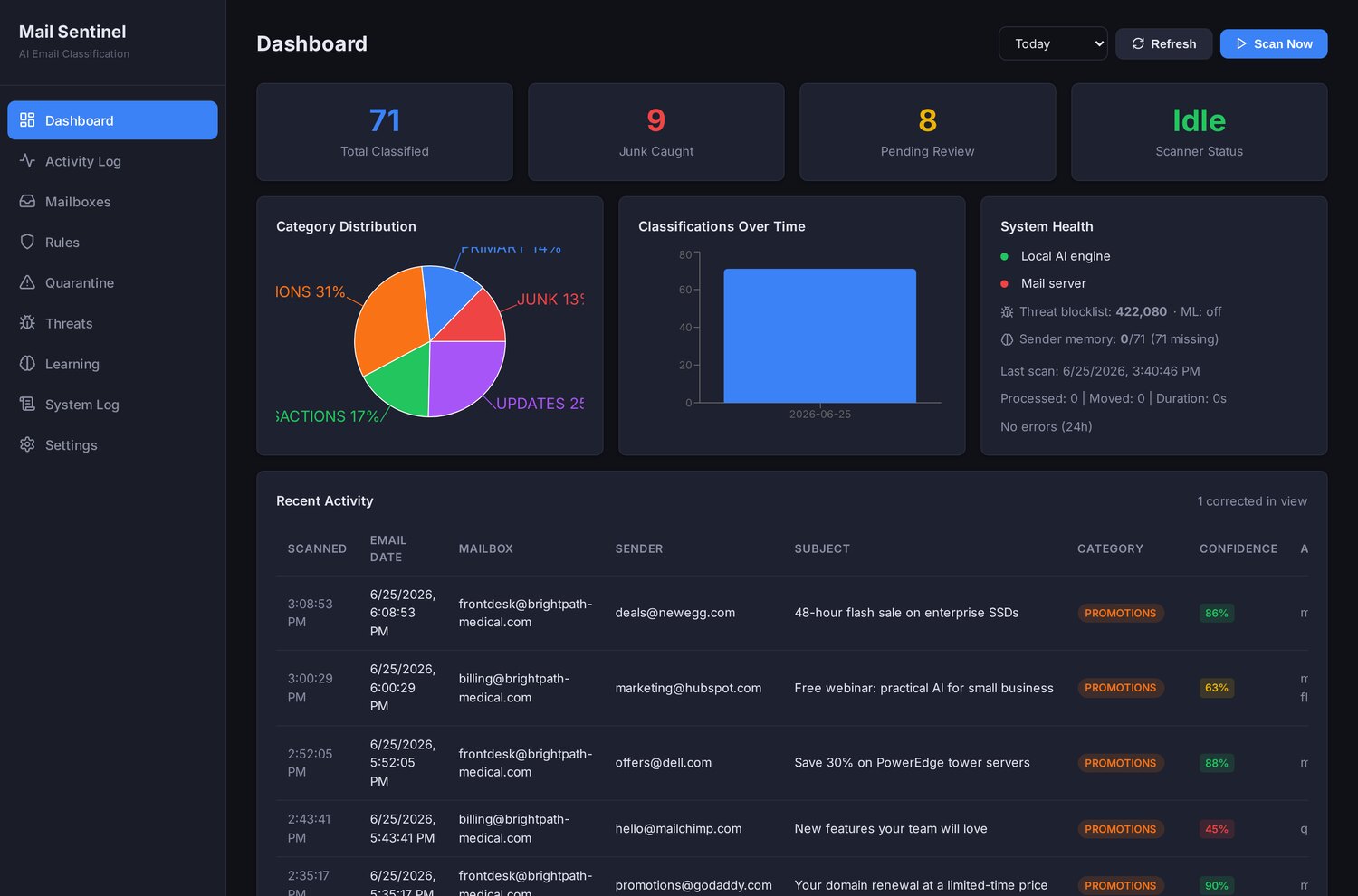
The console is the daily line check. Four tiles across the top read out the numbers that matter, Total Classified, Junk Caught, Pending Review, and Scanner Status, so at a glance you see how much mail has been handled, how much noise was stopped, how much is waiting on a person, and whether the system is up. Below that, the recent stream shows each message with the category Mail Sentinel assigned and the confidence behind the call. The point of this screen is honesty: at any moment you can see not just what the system did, but how sure it was, there’s no black box quietly rearranging your mail.
The quarantine queue
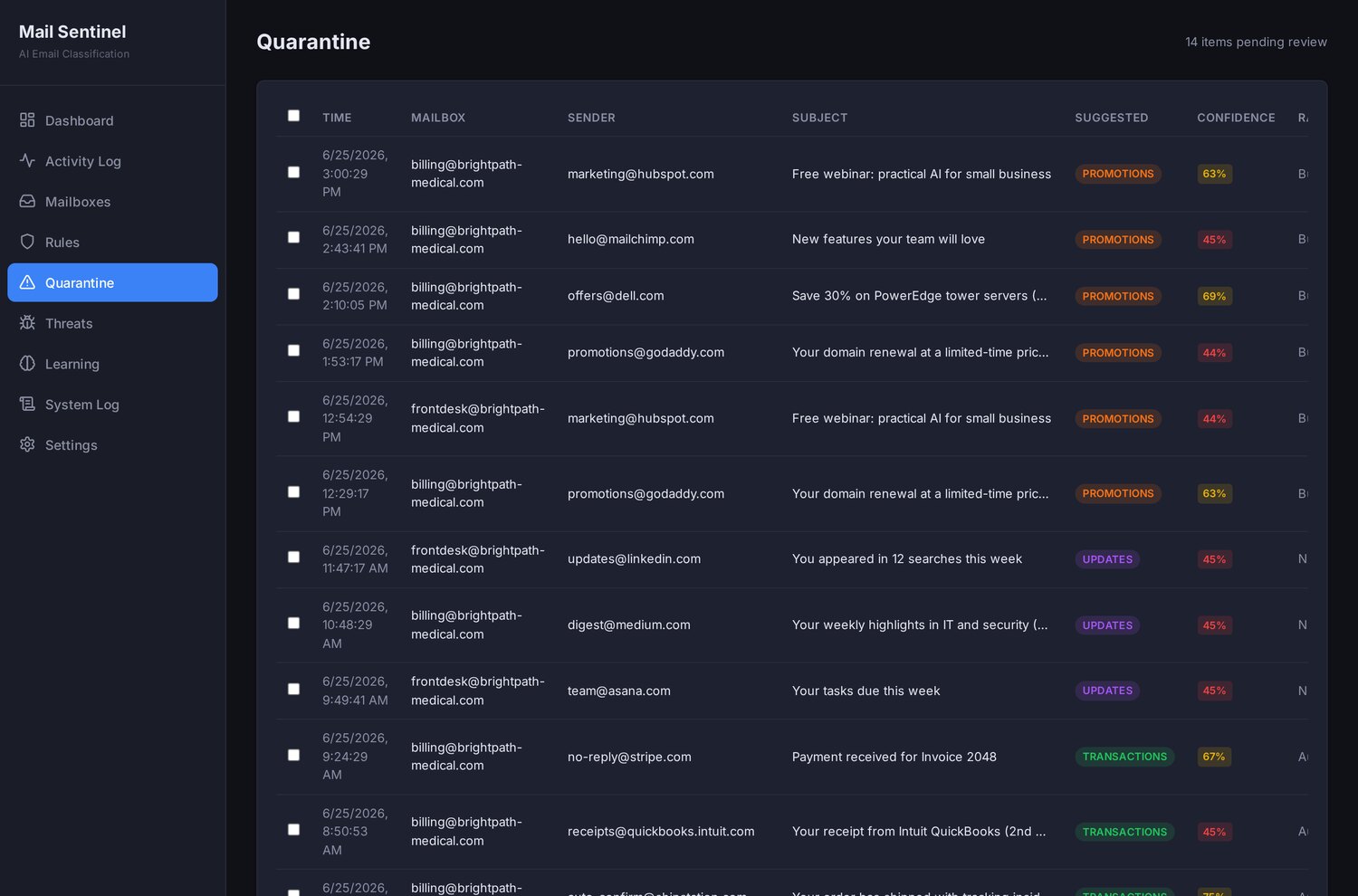
This is the most important screen in the product, because it’s where the system admits what it doesn’t know. Mail Sentinel never blindly files. Every classification carries a confidence score, and that score decides what happens next: at 0.85 and above the message is auto-filed; between 0.60 and 0.84 it’s filed but flagged, so a person can second-guess it; and below 0.60 it isn’t touched at all, it’s sent to quarantine, where it waits for a human to make the call. The review queue here shows fourteen messages, each row laying out the sender, the subject, the category Mail Sentinel would assign, and the confidence behind it. It gathers both kinds that warrant a human glance, the quarantined ones it left untouched, and the flagged ones it filed but wasn’t sure about, so nothing here is acted on without a person’s eyes available to it. Uncertainty becomes a question put to a person, not a guess the machine commits to: we would rather hand you fourteen messages to glance at than silently misfile one that mattered.
Whitelist and blacklist rules
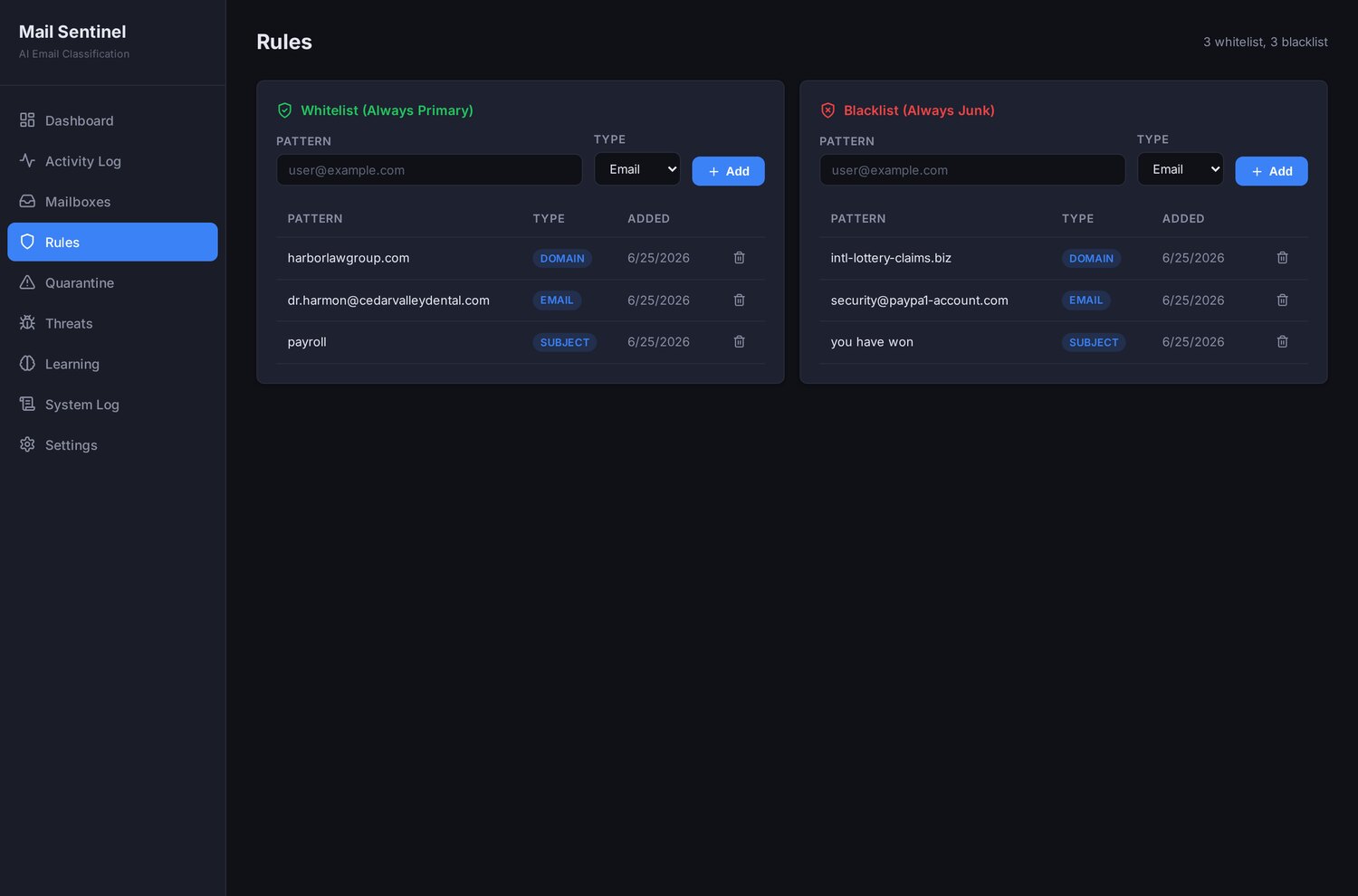
Some decisions don’t need an AI at all, and pretending they do is how you introduce risk. Mail Sentinel lets you set hard rules by email address, by domain, or by subject, and a hard rule beats the model, every time. Your biggest client’s domain is always Primary, no matter how an individual message is phrased. A known-bad sender is always Junk. A subject line your billing system always uses can be routed without a model ever weighing in. This screen is where the deterministic edges of the system live. The AI is for the vast ambiguous middle; the edges are yours, and they’re absolute.
Threat detection
Triage and security are the same job from two angles, so Mail Sentinel inspects the technical envelope of every message, not just its words. It checks whether the message passed SPF and DKIM and watches for a Reply-To that doesn’t match the From, the classic redirect behind a spoofed reply, and hands those signals to the model as context, so a message that reads friendly but fails its own authentication is judged accordingly.
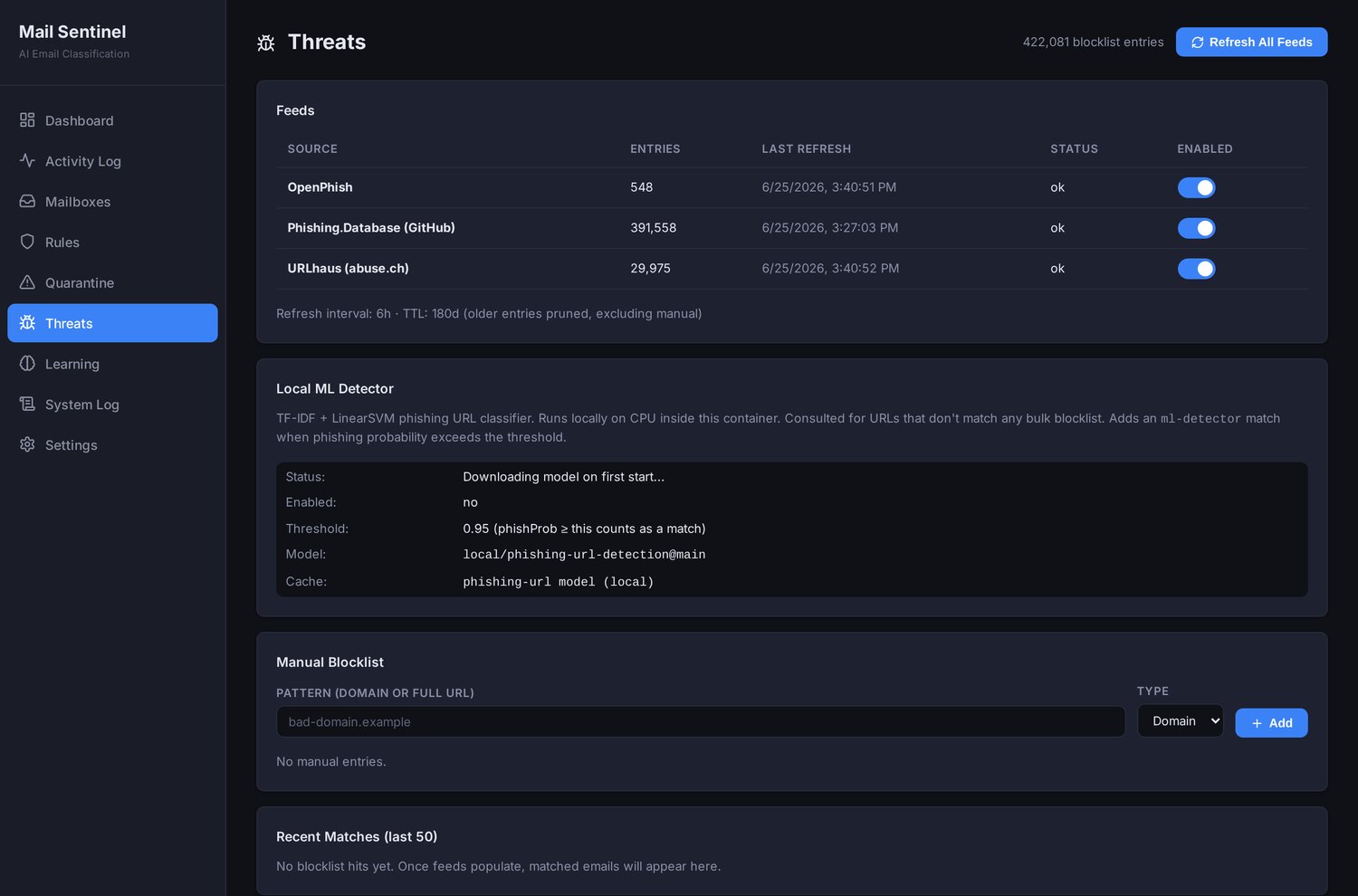
The links are where Mail Sentinel does its heaviest security work. Every URL and domain in a message is checked against three live, industry-standard phishing feeds, OpenPhish, URLhaus, and Phishing.Database, refreshed around the clock, roughly every six hours, so a freshly reported malicious link is known within hours of going public. For any URL the feeds haven’t catalogued yet, a local machine-learning model scores the link’s phishing probability on our own hardware and flags the high-probability ones. A known-bad link doesn’t get the benefit of the doubt, and a brand-new one still gets a verdict.
Put together, here is the path a single message takes. It lands in the inbox; Mail Sentinel parses the headers and sees it passed SPF and that its Reply-To matches the From; it checks the links against the phishing feeds and finds them clean; the local model reads the whole message and returns a verdict, say, Transactions at 0.93 confidence. Because that clears the auto-file threshold, Mail Sentinel tags the message, and a separate scheduled agent does the actual filing a few minutes later. No human had to touch it, and no human lost the ability to.
Why it runs on AI you own
Here is the catch that makes a lot of businesses hesitate, and they’re right to: to sort your mail, something has to read your mail. If that something is a generic cloud AI service, then every message, including the confidential ones, leaves your network and passes through a company you’ve never met.
For a great many offices, that’s a dealbreaker, and it should be. A medical practice’s inbox carries patient information. A law firm’s carries privileged client matters. An accounting firm’s carries financial records during the worst weeks of the year. “We’ll just pipe all of it through an outside AI to get it sorted” isn’t a convenience decision for those teams, it’s a confidentiality decision, and in healthcare it’s a HIPAA one. Cloud-based email triage is simply off the table for them, which is why they’ve gone without.
Mail Sentinel was built specifically to remove that trade-off. The classification runs on Local AI, a private AI engine that lives on-premise, on hardware you control. The mail is read, understood, and sorted entirely on your own equipment, and the contents never leave the building. You get the time savings of AI triage without handing the data to anyone, which, for a confidential inbox, is the entire decision.
It’s fair to ask an MSP whose hardware that is. To be exact: we run our own copy on our own equipment, against our own live mail, that is where the in-production proof comes from. For a client, the private engine is deployed at your site, or as a dedicated instance only you control, and classification happens entirely there: message contents are never sent to us, never sent to any cloud, and access is controlled and audited. Being your MSP does not mean we read your mail, it means we stand the engine up and hand you the controls.
And Mail Sentinel is a triage layer, not a mail platform. We built and run ours on HCL Domino, but the valuable part, the classification, the thresholds, the quarantine, the threat checks, is independent of where your mail lives. We adapt the connector to the platform you already run rather than asking you to switch.
Where the AI helps, and where it stops
The privacy story is only half of why owners trust Mail Sentinel with live mail. The other half is that it’s built, end to end, to keep a person in command.
It starts by doing nothing. Out of the box, Mail Sentinel runs in dry-run mode, it watches, it classifies, and it shows you exactly what it would have done, without moving a single message. You grade its homework for as long as you like before you ever hand it the keys. Test before you automate; the system is designed so you can.
It tags, it never deletes. Even once it’s live, Mail Sentinel doesn’t reach into your mailbox to move or destroy anything. It writes a tag, a label, and a separate, scheduled process does the actual filing afterward, operating inside your mail system’s own permission model. The classifier itself has no authority to delete. That’s a structural guarantee, not a promise: the part of the system that makes judgments is incapable of erasing a message, so a wrong call can never be a lost message.
It learns your mail, not mail in general. When you overrule a classification, “no, anything from this sender is always Primary”, that correction is remembered and applied to that sender from then on, folded into how the model is prompted the next time it sees them. It’s learning without retraining: the system gets measurably better at your inbox with every correction. And the one place it acts on its own, auto-blacklisting a persistent nuisance, only ever triggers from repeated human junkings, never because the AI kept agreeing with its own earlier guess. That guardrail keeps the model from drifting by training on its own opinions.
This is the principle behind everything we build: AI layered on top of your people, never in place of them. Mail Sentinel staffs the door and sorts the crowd; your team still decides who gets seen, and when.
Who it’s for
Inbox overload is universal, but a few kinds of business feel both the pain and the payoff most sharply:
- Medical practices with a front desk buried under patient messages, lab results, and scheduling, where the one urgent note has to surface above a flood of portal notifications.
- Law and accounting firms whose inboxes swell with privileged documents and time-sensitive requests in the very seasons a missed message is most expensive.
- Growing companies whose lead volume has outpaced the person who used to “just keep an eye on the inbox,” and who can feel opportunities slipping through the cracks.
For any of these, AI triage is one of the fastest-to-value AI projects you can stand up, because it targets a process every office already has and every office already resents. We won’t promise a precise percentage, that depends on your mail volume and your team, but on our own inbox the large majority of messages are filed before anyone opens it, and that recovered time is the recurring payoff.
Why this is the close, not the pitch
Plenty of vendors will sell you an email tool. What’s different here is that Mail Sentinel is real software we designed, built, and run in our own business, pointed at our own mail, in production, fixed until it was simply part of how we operate. The discipline inside it is the same one we bring to managed IT and to every AI system we build for clients: do the grinding work with AI, keep a person on every decision that carries consequence, and never move the sensitive data off the premises to do it. That is what we mean when we call ourselves a managed intelligence provider, practical AI that takes over a specific, error-prone workflow and runs it under human supervision, on infrastructure and security that stay solid underneath.
Your inbox is the front door of your business whether you treat it like one or not, and for most companies no one is watching it, the cost paid quietly in slow replies, missed leads, and dropped requests. Mail Sentinel puts a tireless greeter at that door: one that reads everything, surfaces what’s urgent, files the noise, catches the threats, learns your preferences, and, because it runs on AI you own, never lets a single confidential message leave the building.
Start with a short look at how your team handles email today. We’ll see where the time actually goes in your inbox, and whether a private, on-premise triage layer, one we stand up on your existing mail rather than build from scratch, is worth turning on for your front door.
Frequently asked questions
Does Mail Sentinel send my emails to the cloud?
No. The classification runs on a private AI engine that lives on-premise, on hardware you control, and the contents never leave the building. For a client it's deployed at your site or as a dedicated instance only you control, message contents are never sent to the provider or to any cloud, and access is controlled and audited.
What happens if Mail Sentinel classifies an email wrong?
Every classification carries a confidence score. At 0.85 and above the message is auto-filed; between 0.60 and 0.84 it's filed but flagged for a second look; below 0.60 it isn't touched and goes to a quarantine queue for a person to decide. Because it only tags mail and a separate process does the filing, a wrong call never deletes anything.
Do I have to switch email systems to use Mail Sentinel?
No. Mail Sentinel is a triage layer, not a mail platform. It was built and run on HCL Domino, but the valuable part, the classification, thresholds, quarantine, and threat checks, works independently of where your mail lives. Rather than asking you to switch, the connector is adapted to the platform you already run.
How does Mail Sentinel detect phishing emails?
It inspects each message's technical envelope, checking whether it passed SPF and DKIM and whether the Reply-To quietly differs from the From. Every link is checked against three live phishing feeds, OpenPhish, URLhaus, and Phishing.Database, refreshed roughly every six hours. For URLs the feeds haven't catalogued yet, a local machine-learning model scores the link's phishing probability on your own hardware.
Mail Sentinel: Local-AI Email Triage for Inboxes That Can't Go to the Cloud
Mail Sentinel sorts every message into five buckets using local AI we own, with confidence thresholds, a quarantine queue, and a human always in charge.
Executive summary
Every business has a front door it never staffs: the inbox. New leads, requests for a quote, a client with an urgent question, the invoice that has to be paid this week, the things that actually move a company arrive as email, through the same narrow opening as sixty newsletters, shipping notices, and promotions. There is a tidy desk and a greeter at the physical door. At the busiest door in the building there is no one, and the message worth real money sits in the same undifferentiated pile as a coupon.
Mail Sentinel is the system we built to staff that door. It reads every incoming message and sorts it into five buckets, Primary, Transactions, Updates, Promotions, Junk, the same organization modern phones have started applying to personal mail, brought to the business inbox. It runs on a local AI engine, on hardware we own, the model never hands a message to a cloud API, and that single detail is what makes AI email triage usable for the businesses that need it most: medical practices, law firms, and accounting offices whose inbox is full of exactly the information you can’t paste into a public chatbot. It’s live in production today, more than 15,000 messages classified on our own live mail, the large majority filed automatically before anyone opened the inbox, and built around one discipline: the AI does the sorting, and a human is always able to see it, correct it, and stay in charge.
This paper walks through the problem Mail Sentinel solves, the real screens that solve it, and, more than anything, the purpose behind each design decision.
The problem: the front door nobody is watching
A spam filter keeps out the obvious garbage and stops there. Everything that isn’t spam lands inside as one undifferentiated pile, and the actual sorting problem, what’s urgent, what’s a real person, what can wait until Thursday, is still entirely yours. That pile is where the quiet, expensive failures happen, and none of them are dramatic enough to show up on a report.
- Slow first responses. Speed-to-lead is one of the most studied numbers in sales, and the pattern never changes: the business that replies first usually wins. When the inquiry is buried four screens down under promotions, your reply time isn’t measured in minutes, it’s measured in “whenever someone scrolled far enough.”
- Dropped requests. A client emails about a problem. It lands between two newsletters and a shipping notice, nobody flags it, and three days later you’re not having a support conversation, you’re having a “why didn’t anyone get back to me” conversation.
- The morning triage tax. Before real work starts, someone spends the first stretch of the day just sorting, deciding what matters, what can wait, what to forward. It’s pure overhead, it happens every day, and it never gets faster on its own.
- Decision fatigue. Every “is this important?” judgment is a small withdrawal from a person’s attention. By mid-morning the account that pays the bills and a vendor coupon get the same tired glance.
Added up across a year, the unstaffed front door is one of the most expensive things in the building, and the one nobody is assigned to fix.
The solution: Mail Sentinel
Mail Sentinel is the layer that goes past the spam filter. Instead of a single keep-or-block decision, it reads each message the way a sharp assistant would, the sender, the subject, the actual content, and the quieter technical signals most people never see: whether the message passed SPF and DKIM, whether the Reply-To quietly points somewhere other than the From, whether its links turn up on a live phishing feed, and assigns it to one of five categories. Primary is genuine person-to-person mail that deserves a human’s attention. Transactions are the receipts, confirmations, and statements you want kept but rarely need to act on. Updates are routine notifications. Promotions is marketing. Junk is the noise that shouldn’t have arrived at all. The result is an inbox that’s already organized by the time anyone opens it, you walk up to a sorted front desk instead of a crowd in the lobby.
The part that earns its keep is understanding. Plenty of rules can move mail around when a sender or subject matches exactly; they fall apart the moment a message is phrased a little differently than expected. A model reads for meaning, so a brand-new prospect Mail Sentinel has never seen still gets recognized as a real human inquiry and pushed to Primary, while the fourth automated report of the day files itself into Updates. Run under your supervision on a private engine, it behaves like one of your AI virtual employees: it shows up every morning, never tires, and does the one tedious job it was hired for. What follows are the real screens, and the reasoning behind each.
How it works, the real screens
The console
The console is the daily line check. Four tiles across the top read out the numbers that matter, Total Classified, Junk Caught, Pending Review, and Scanner Status, so at a glance you see how much mail has been handled, how much noise was stopped, how much is waiting on a person, and whether the system is up. Below that, the recent stream shows each message with the category Mail Sentinel assigned and the confidence behind the call. The point of this screen is honesty: at any moment you can see not just what the system did, but how sure it was, there’s no black box quietly rearranging your mail.
The quarantine queue
This is the most important screen in the product, because it’s where the system admits what it doesn’t know. Mail Sentinel never blindly files. Every classification carries a confidence score, and that score decides what happens next: at 0.85 and above the message is auto-filed; between 0.60 and 0.84 it’s filed but flagged, so a person can second-guess it; and below 0.60 it isn’t touched at all, it’s sent to quarantine, where it waits for a human to make the call. The review queue here shows fourteen messages, each row laying out the sender, the subject, the category Mail Sentinel would assign, and the confidence behind it. It gathers both kinds that warrant a human glance, the quarantined ones it left untouched, and the flagged ones it filed but wasn’t sure about, so nothing here is acted on without a person’s eyes available to it. Uncertainty becomes a question put to a person, not a guess the machine commits to: we would rather hand you fourteen messages to glance at than silently misfile one that mattered.
Whitelist and blacklist rules
Some decisions don’t need an AI at all, and pretending they do is how you introduce risk. Mail Sentinel lets you set hard rules by email address, by domain, or by subject, and a hard rule beats the model, every time. Your biggest client’s domain is always Primary, no matter how an individual message is phrased. A known-bad sender is always Junk. A subject line your billing system always uses can be routed without a model ever weighing in. This screen is where the deterministic edges of the system live. The AI is for the vast ambiguous middle; the edges are yours, and they’re absolute.
Threat detection
Triage and security are the same job from two angles, so Mail Sentinel inspects the technical envelope of every message, not just its words. It checks whether the message passed SPF and DKIM and watches for a Reply-To that doesn’t match the From, the classic redirect behind a spoofed reply, and hands those signals to the model as context, so a message that reads friendly but fails its own authentication is judged accordingly.
The links are where Mail Sentinel does its heaviest security work. Every URL and domain in a message is checked against three live, industry-standard phishing feeds, OpenPhish, URLhaus, and Phishing.Database, refreshed around the clock, roughly every six hours, so a freshly reported malicious link is known within hours of going public. For any URL the feeds haven’t catalogued yet, a local machine-learning model scores the link’s phishing probability on our own hardware and flags the high-probability ones. A known-bad link doesn’t get the benefit of the doubt, and a brand-new one still gets a verdict.
Put together, here is the path a single message takes. It lands in the inbox; Mail Sentinel parses the headers and sees it passed SPF and that its Reply-To matches the From; it checks the links against the phishing feeds and finds them clean; the local model reads the whole message and returns a verdict, say, Transactions at 0.93 confidence. Because that clears the auto-file threshold, Mail Sentinel tags the message, and a separate scheduled agent does the actual filing a few minutes later. No human had to touch it, and no human lost the ability to.
Why it runs on AI you own
Here is the catch that makes a lot of businesses hesitate, and they’re right to: to sort your mail, something has to read your mail. If that something is a generic cloud AI service, then every message, including the confidential ones, leaves your network and passes through a company you’ve never met.
For a great many offices, that’s a dealbreaker, and it should be. A medical practice’s inbox carries patient information. A law firm’s carries privileged client matters. An accounting firm’s carries financial records during the worst weeks of the year. “We’ll just pipe all of it through an outside AI to get it sorted” isn’t a convenience decision for those teams, it’s a confidentiality decision, and in healthcare it’s a HIPAA one. Cloud-based email triage is simply off the table for them, which is why they’ve gone without.
Mail Sentinel was built specifically to remove that trade-off. The classification runs on Local AI, a private AI engine that lives on-premise, on hardware you control. The mail is read, understood, and sorted entirely on your own equipment, and the contents never leave the building. You get the time savings of AI triage without handing the data to anyone, which, for a confidential inbox, is the entire decision.
It’s fair to ask an MSP whose hardware that is. To be exact: we run our own copy on our own equipment, against our own live mail, that is where the in-production proof comes from. For a client, the private engine is deployed at your site, or as a dedicated instance only you control, and classification happens entirely there: message contents are never sent to us, never sent to any cloud, and access is controlled and audited. Being your MSP does not mean we read your mail, it means we stand the engine up and hand you the controls.
And Mail Sentinel is a triage layer, not a mail platform. We built and run ours on HCL Domino, but the valuable part, the classification, the thresholds, the quarantine, the threat checks, is independent of where your mail lives. We adapt the connector to the platform you already run rather than asking you to switch.
Where the AI helps, and where it stops
The privacy story is only half of why owners trust Mail Sentinel with live mail. The other half is that it’s built, end to end, to keep a person in command.
It starts by doing nothing. Out of the box, Mail Sentinel runs in dry-run mode, it watches, it classifies, and it shows you exactly what it would have done, without moving a single message. You grade its homework for as long as you like before you ever hand it the keys. Test before you automate; the system is designed so you can.
It tags, it never deletes. Even once it’s live, Mail Sentinel doesn’t reach into your mailbox to move or destroy anything. It writes a tag, a label, and a separate, scheduled process does the actual filing afterward, operating inside your mail system’s own permission model. The classifier itself has no authority to delete. That’s a structural guarantee, not a promise: the part of the system that makes judgments is incapable of erasing a message, so a wrong call can never be a lost message.
It learns your mail, not mail in general. When you overrule a classification, “no, anything from this sender is always Primary”, that correction is remembered and applied to that sender from then on, folded into how the model is prompted the next time it sees them. It’s learning without retraining: the system gets measurably better at your inbox with every correction. And the one place it acts on its own, auto-blacklisting a persistent nuisance, only ever triggers from repeated human junkings, never because the AI kept agreeing with its own earlier guess. That guardrail keeps the model from drifting by training on its own opinions.
This is the principle behind everything we build: AI layered on top of your people, never in place of them. Mail Sentinel staffs the door and sorts the crowd; your team still decides who gets seen, and when.
Who it’s for
Inbox overload is universal, but a few kinds of business feel both the pain and the payoff most sharply:
- Medical practices with a front desk buried under patient messages, lab results, and scheduling, where the one urgent note has to surface above a flood of portal notifications.
- Law and accounting firms whose inboxes swell with privileged documents and time-sensitive requests in the very seasons a missed message is most expensive.
- Growing companies whose lead volume has outpaced the person who used to “just keep an eye on the inbox,” and who can feel opportunities slipping through the cracks.
For any of these, AI triage is one of the fastest-to-value AI projects you can stand up, because it targets a process every office already has and every office already resents. We won’t promise a precise percentage, that depends on your mail volume and your team, but on our own inbox the large majority of messages are filed before anyone opens it, and that recovered time is the recurring payoff.
Why this is the close, not the pitch
Plenty of vendors will sell you an email tool. What’s different here is that Mail Sentinel is real software we designed, built, and run in our own business, pointed at our own mail, in production, fixed until it was simply part of how we operate. The discipline inside it is the same one we bring to managed IT and to every AI system we build for clients: do the grinding work with AI, keep a person on every decision that carries consequence, and never move the sensitive data off the premises to do it. That is what we mean when we call ourselves a managed intelligence provider, practical AI that takes over a specific, error-prone workflow and runs it under human supervision, on infrastructure and security that stay solid underneath.
Your inbox is the front door of your business whether you treat it like one or not, and for most companies no one is watching it, the cost paid quietly in slow replies, missed leads, and dropped requests. Mail Sentinel puts a tireless greeter at that door: one that reads everything, surfaces what’s urgent, files the noise, catches the threats, learns your preferences, and, because it runs on AI you own, never lets a single confidential message leave the building.
Start with a short look at how your team handles email today. We’ll see where the time actually goes in your inbox, and whether a private, on-premise triage layer, one we stand up on your existing mail rather than build from scratch, is worth turning on for your front door.
Frequently asked questions
Does Mail Sentinel send my emails to the cloud?
No. The classification runs on a private AI engine that lives on-premise, on hardware you control, and the contents never leave the building. For a client it's deployed at your site or as a dedicated instance only you control, message contents are never sent to the provider or to any cloud, and access is controlled and audited.
What happens if Mail Sentinel classifies an email wrong?
Every classification carries a confidence score. At 0.85 and above the message is auto-filed; between 0.60 and 0.84 it's filed but flagged for a second look; below 0.60 it isn't touched and goes to a quarantine queue for a person to decide. Because it only tags mail and a separate process does the filing, a wrong call never deletes anything.
Do I have to switch email systems to use Mail Sentinel?
No. Mail Sentinel is a triage layer, not a mail platform. It was built and run on HCL Domino, but the valuable part, the classification, thresholds, quarantine, and threat checks, works independently of where your mail lives. Rather than asking you to switch, the connector is adapted to the platform you already run.
How does Mail Sentinel detect phishing emails?
It inspects each message's technical envelope, checking whether it passed SPF and DKIM and whether the Reply-To quietly differs from the From. Every link is checked against three live phishing feeds, OpenPhish, URLhaus, and Phishing.Database, refreshed roughly every six hours. For URLs the feeds haven't catalogued yet, a local machine-learning model scores the link's phishing probability on your own hardware.